The drivers and teams report back on all the action from the 2026 Bahrain Grand Prix in Malaysia at the Sepang International Circuit.
The Bahrain Grand Prix in Malaysia ended in heartbreak for George Russell, with the Mercedes driver forced to retire late on due to a mechanical issue.
Lewis Hamilton finished P3 at the Bahrain Grand Prix in Malaysia, despite dropping behind by a minute during the race.
Some highlights from special collections libraries' blogs this week.
The Flowers of Elizabeth Sprague Coolidge, Preserved from Another Century
Colorful travel guides and alluring destinations: How to have a good time in Edo Japan
James Gillray and Georgian Medical Satire
Caxton 550 A video series celebrating the anniversary of England's first printing press
The Flowers of Elizabeth Sprague Coolidge, Preserved from Another Century
Colorful travel guides and alluring destinations: How to have a good time in Edo Japan
James Gillray and Georgian Medical Satire
Caxton 550 A video series celebrating the anniversary of England's first printing press

beeldmark has added a photo to the pool:

SergioQ79 - Osanpo Photographer - has added a photo to the pool:

Kita-Senju si trova nel distretto di Adachi-ku, nella parte nord-orientale di Tokyo. È un’area urbana legata alla vita della stazione, alle strade commerciali e alle attività quotidiane dei residenti.
Gli edifici mostrano epoche diverse. Le strutture più recenti convivono con facciate più vecchie, impianti esterni, passaggi e attività distribuite sui pochi spazi disponibili. Le scritte in kanji e hiragana rendono riconoscibile il Giappone, ma non identificano immediatamente Tokyo.
Qui la città non appare come una destinazione. È un luogo in cui si lavora, si fanno acquisti, si mangia e si passa durante la giornata.
Kita-Senju è Tokyo. Quella vera.
北千住は、東京の北東部にある足立区の町。駅を中心に、商店街や住宅、日常的に利用される店が広がっている。
建物には、それぞれの時代が重なっている。新しい建物の隣に古い外壁があり、外に出た設備や狭い通路、限られた空間を使う店が続いている。漢字やひらがなから日本だとわかる。けれど、東京だとすぐにわかる目印はない。
ここは観光のための場所ではない。
人が働き、買い物をし、食事をし、日常の時間を過ごす町。
北千住は東京だ。これが、本当の東京だ。
Kita-Senju is located in Adachi Ward, in the north-eastern part of Tokyo. It is an urban area shaped by the station, local shopping streets, and the daily routines of its residents.
The buildings show different periods of development. Newer structures coexist with older façades, exposed utilities, narrow passages, and businesses occupying every available space. The kanji and hiragana make Japan recognisable, but they do not immediately identify Tokyo.
Here, the city does not appear as a destination. It is a place where people work, shop, eat, and move through the day.
Kita-Senju is Tokyo. The real one.
Mr Mikage (ミスター御影) has added a photo to the pool:

Attorney says people have threatened to silence or harm ‘Jane Doe’ if she does not withdraw civil lawsuit
The woman who has alleged that she was drugged and raped by Cornell University students has been the target of threats, her lawyer said on Sunday.
Thomas Giuffra, who represents the woman identified as “Jane Doe”, told CNN that people have threatened to silence or harm her if she does not withdraw her civil lawsuit alleging that several members of a Cornell fraternity drugged and raped her in 2024.
Continue reading...Antonelli and Hamilton led the criticism in Sepang
Race delayed for 53 minutes after software problems
Formula One drivers issued a damning condemnation of the sport’s current engine regulations that caused the Bahrain Grand Prix in Malaysia to open with farcical scenes of cars stopping on track and unable to accelerate because of software problems in the electronics that control the engines.
Red Bull’s Max Verstappen won in Sepang but only after F1 suffered the embarrassment of a host of cars barely able to complete two formation laps in the wet as they were making their way to the grid.
Continue reading...
De Rotterdamse R&B-formatie Re-Play brak in de jaren negentig door met hits als Ala day (Ik leef alleen voor jou) en Never nooit meer. Op 9 oktober viert de groep zijn 30-jarig bestaan met een jubileumconcert in Ahoy. “Wij zijn nooit gestopt.”

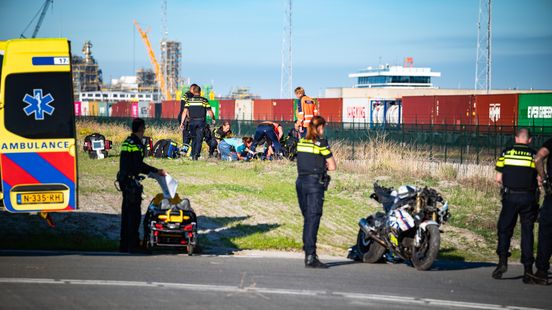
Een motorrijder is zondagmiddag zwaargewond geraakt bij een eenzijdig ongeval op de Maasvlakte. Door de klap kwam hij meters van de weg terecht op de zandvlakte. Met spoed is het slachtoffer vervoerd naar het ziekenhuis.

SergioQ79 - Osanpo Photographer - posted a photo:
Kita-Senju si trova nel distretto di Adachi-ku, nella parte nord-orientale di Tokyo. È un’area urbana legata alla vita della stazione, alle strade commerciali e alle attività quotidiane dei residenti.
Gli edifici mostrano epoche diverse. Le strutture più recenti convivono con facciate più vecchie, impianti esterni, passaggi e attività distribuite sui pochi spazi disponibili. Le scritte in kanji e hiragana rendono riconoscibile il Giappone, ma non identificano immediatamente Tokyo.
Qui la città non appare come una destinazione. È un luogo in cui si lavora, si fanno acquisti, si mangia e si passa durante la giornata.
Kita-Senju è Tokyo. Quella vera.
北千住は、東京の北東部にある足立区の町。駅を中心に、商店街や住宅、日常的に利用される店が広がっている。
建物には、それぞれの時代が重なっている。新しい建物の隣に古い外壁があり、外に出た設備や狭い通路、限られた空間を使う店が続いている。漢字やひらがなから日本だとわかる。けれど、東京だとすぐにわかる目印はない。
ここは観光のための場所ではない。
人が働き、買い物をし、食事をし、日常の時間を過ごす町。
北千住は東京だ。これが、本当の東京だ。
Kita-Senju is located in Adachi Ward, in the north-eastern part of Tokyo. It is an urban area shaped by the station, local shopping streets, and the daily routines of its residents.
The buildings show different periods of development. Newer structures coexist with older façades, exposed utilities, narrow passages, and businesses occupying every available space. The kanji and hiragana make Japan recognisable, but they do not immediately identify Tokyo.
Here, the city does not appear as a destination. It is a place where people work, shop, eat, and move through the day.
Kita-Senju is Tokyo. The real one.
Greg Adams Photography posted a photo:

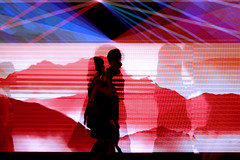
Porto, Portugal's famous Dom Luís I Bridge over the Douro River at night.
ŠENČUR (ANP) - Remco Evenepoel heeft zondag in Slovenië de Europese titel wielrennen veroverd. De Belg versloeg de Italiaan Giulio Ciccone in een spannende sprint à deux. Een andere Italiaan, Christian Scaroni, werd op een kleine minuut derde.
Het is de eerste Europese titel voor Evenepoel. Eerder werd hij al olympisch en wereldkampioen op zowel de wegwedstrijd als in de tijdrit, en won hij de tijdrit op de EK wielrennen.
Evenepoel is de opvolger van vijfvoudig Tourwinnaar en tweevoudig wereldkampioen Tadej Pogačar. Door een val in de Vuelta kon de Sloveen zijn Europese titel niet verdedigen in zijn thuisland. Hij was wel aanwezig bij de finish in Šenčur.
Koers
De Belgen controleerden de koers, die pas laat ontbrandde. De wedstrijd, die van start was gegaan in de Sloveense hoofdstad Ljubljana, telde 196,3 kilometer en 2571 hoogtemeters. Maar pas in de voorlaatste ronde van het lokale parcours rondom finishplaats Šenčur begon de finale.
Op de Možjanca, een steil klimmetje dat als scherprechter in de wedstrijd zou dienen, plaatste Ciccone zijn aanval. Evenepoel sprong direct naar zijn wiel en haalde de Italiaan in. In een bocht op de top kwam Evenepoel ten val en ging Ciccone er alleen vandoor. In de afdaling werd de Italiaan teruggegrepen door een elitegroepje, inclusief Evenepoel.
Onverwacht moment
De Belg koos een onverwacht moment uit om zijn aanval te plaatsen, op ruim 32 kilometer van de aankomst. Samen met Ciccone reed hij weg bij de rest. In de laatste ronde weigerde Ciccone lange tijd kopbeurten te doen, omdat Scaroni achtervolgde. De Italiaan had de beste aanzet in de eindsprint en pakte een voorsprong op de Belg. In de laatste meters wist Evenepoel langszij te komen. Een fotofinish wees uit dat de titel naar Evenepoel ging.
Wout Poels, die op 39-jarige leeftijd de kopman was van de Nederlandse ploeg, moest opgeven na een val. Het Nederlandse team speelde geen rol van betekenis. Zaterdag was dat bij de vrouwen wel het geval. De kersverse wereldkampioene Demi Vollering prolongeerde haar Europese titel. Woensdag worden de tijdritten verreden.

In de metro waarin Marcel van Roosmalen en zijn dochter (11) zaten, schreeuwde een man dat iedereen vijf minuten had om zijn telefoon en portemonnee bij hem in te leveren. De mensen keken de andere kant op en deden net alsof het niet gebeurde. Mijn dochter had per ongeluk wel oogcontact gemaakt en kon daar niet meer mee stoppen omdat ze dacht dat hij ons nu in de gaten hield.
:format(jpeg):fill(f8f8f8,true)/s3/static.nrc.nl/bvhw/wp-content/blogs.dir/114/files/2019/07/roosmalen-marcel-van-online-homepage.png)